Writing a simple program
First program:
#include <stdio.h>

int main(void)
{
  print("To C, or not to C: That is the question.\n");
  return 0;
}- The
#include <stdio.h>includes information from C’s standard I/O library. - The executable portion of the code goes into
main printfcomes from the stdioreturn 0;returns the value 0 to the operating system when the program terminates.
Compiling and linking
Before the program can run we have three steps:
- Preprocessing - The program is given to the preprocessor which follows the commands that begin with
#(directives).- The preprocessor can add/modify the program
- Compiling - The modified program from the preprocessor goes to the compiler, which translates it to machine instructions (object code)
- Linking - A linker combines the object code with any necessarily additional code (e.g. functions from a library) that are used in the program.
We can compile the code in terminal by navigating to the folder and running:
cc pun.c- This creates a file
a.out, which is an executable that can be run (default)
We could specify the name of the output file if we did:
cc -o pun pun.c- This produces
pun.out
The a.out file can be run with the following in terminal:
./a.outThe General Form of a Simple Program
A basic C program follows the following form:
directives

int main(void)
{
  statements
}
The simplist C programs rely on three language features:
- Directives: Editing commands that modify the program prior to compilation
- Functions: Named blocks of executable code (e.g.
main) - Statements: Commands to be performed when the program is run
Directives
Before a C program is complied, it is edited by the preprocessor. - Commands for the preprocessor are called directives
The punc.c program begins with:
#include <stdio.h>- This directive states that the information in
<stdio.h>is to be included in the program before it is compiled.<stdio.h>contains information about the standard I/O library.- C has a number of these headers as there are no built-in commands for things like read/write.
- Directives always begin with a # character
- By default, they are one line long, without a semicolon at the end.
Functions
Functions are procedures/subroutines that are the building blocks from which programs are built. Functions fall into two categories: - Written by the programmer - Provided by C (library functions)
In C, a function is a series of statements that are group together and given a name.
- Some compute values
- Some return values using the
returnstatement.
All C programs are required to have the main function.
mainis a function, which can also return a value.
Looking at the `pun.c program:
#include <stdio.h>

int main(void)
{
  print("To C, or not to C: That is the question. \n");
  return 0;
}intindicates thatmainwill return an integer value.voidindicates thatmainhas no arguments.return 0has two effects:- Causes
mainto terminates - Indicates that
mainreturns the value 0
If there is no
returnstatement, the program will still terminate, but the compiler may throw a warning.Statements
A statement is a command to be executed when the program runs.
The
pun.cprogram has two kinds of statements:returnand the function call- Causes
A function performing an assigned task is calling the function.
C requires each statement to end with a semicolon.
- A compound statement, doesn’t require a semicolon.
- The semicolon tells the compiler where the statement ends.
Variables and Assignment
Every variable must have a type, which is the kind of data it will hold.
- Choosing the proper type is critical because operations are different depending on the variable’s type.
- Integers for example, can only go up to 2.1M,
floatnumbers stores more digits as well as numbers after the decimals.- The down side is that float are slower for arithmetic and the value tends to have a rounding error (e.g 0.1 could be 0.0999..)
Declarations
Variables must be declared for the compiler, before they are used.
- To declare a variable, first specify the type and then it’s name (e.g.
int height;). - If several variables have the same type, they can be declared at once:
int height, length, width, volume;
float profit, loss;- Declarations always end with a semicolon.
When main contains declarations, they must be preceded by statements:
int main(void)
{
  declarations
  statments
}- In C99, declarations don’t have to come before statements.
mainmight contain a declaration, then statement, then another declaration.
Assignment
A variable can be given a value through assignment:
height = 8;
length = 12;
width = 10;
In general, the right side of of an assignment can be a formulate (expression) involving constants, variables, and operators.
Printing the value of a variable
printf("Height: %d\n", height);%dis a placeholder forheight- By default,
%fdisplays a number with 6 digits after the decimal point - To force
%fto displaypdigits after the decimal point, we can put.pbetween the%and thef:
- By default,
printf("Profit: $%.2f\n", profit)Initialization
Some variables are automatically set to zero when the program begins, but most are not. - A variable that doesn’t have a default value or is assigned one, is said to be uninitialized
NOTE: If we try to access the value of an uninitialized variable, it is likely to return a random value such as 2567, -30891, or some other random number.
- It’s also possible that it crashes the program.
We can declare the variable height and initialize it in one step:
int height = 8;- The value
8is said to be an initializer
Multiple variables can be initialized in the same declaration:
int height = 8, length = 12, width = 10;- Each variable requires its own initializer.
Reading Input
scanf, the counterpart of printf can be used to read inputs.
- The
finscanf/readfstands for “formatted” as both require the use of a format string to specify the appearance of the input or output data. scanfneeds to know what kind of input data will be entered andprintfneeds to know how to display the output data.
For example, reading an int value:
scanf("%d, &i"); /* reads an integer; stores into i */%dtellsscanfto read the input that represents an integer.iis anintvariable wherescanfwill store the input.
Reading a float value is slightly different with scanf:
scanf("%f, &x"); /* reads a float value; stores into x */%fonly works with variables of typefloat
Defining Names for Constants
We can define constants used within a program by giving them a macro definition
#define INCHES_PER_POUND 166- This macro definiton defines INCHES_PER_POUND to equal 166
#defineis a preprocessing directive
We can now use replace the value in our program using the macro:
weight = (volume + INCHES_PER_POUND - 1) / INCHES_PER_POUND;- C convenion is to use only upper-case letters for macro names.
Program to convert Fahrenheit to Celsius
/* Converts Fahrenheit to Celsius */

#include <stdio.h>

#define FREESZING_PT 32.0f
#define SCALE_FACTOR (5.0f/9.0F)

int main(void) {
    float fahrenheit, celsius;

    printf("Enter Fahrenheit temp: ");
    scanf("%f", &fahrenheit);

    celsius = (fahrenheit - FREESZING_PT) * SCALE_FACTOR;

    printf("Celsius equivalent: %.1f\n", celsius);

    return(0);
}
Identifiers
The names we give variables in C are called identifiers. Identifiers can include letters, numbers, and underscores, but must begin with a letter or underscore.
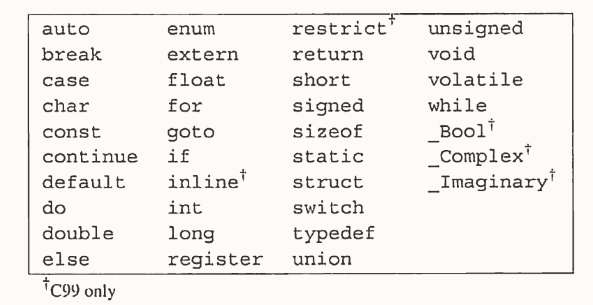
Keywords
These are the keyworks (can’t be used as identifiers) through C99:
FAQ
What happens if a program doesn’t have a return statement?
returnisn’t mandatory and the program will still terminate.In C89, the value returned to the OS is undefined.
In C99, if
mainis supposed to return anint, it returns 0 to the OS. Otherwise, undefined.
How does the compiler handle comments? Does it remove them or enter a blank space (e.g. a/**/b = 0;)?
- The C standard requires the compiler to replace each comment with a space, so the example code would be invalid (
a b = 0).
Can comments be nested?
- Old style comments (
/* */) cannot be nested but C99 comments (//) can be nested within the old ones.
Are there limits to the length of an identifier?
- C89 compilers are only required to remember the first 31 characters (C99 is 63), so if the first 31/63 characters are the same, the compiler may run into issues.
Excerises
1. Create and run K&R’s famous “hello, world” program:
#include <stdio.h>

int main(void)
{
    printf("hello, world\n");
}
Did you get any warning messages from the compiler?
- No issues from
cc
2. Consider the following program:
# include <stdio.h>

int main(void)
{
    printf("Parkinson's Law:\nWork exands so as to ");
    printf("fill the time\n");
    printf("available for its completion.\n");
    return(0)
}
a) Identify the directives and statements in the program.
The derective is
#include <stdio.h>, which loads the standard libraryThe statements are the
printfandreturnstatements.
b) What output does the program produce?
Parkinson’s Law:
Work expands so as to fill the time
available for its completion.
3. Condense the dweight.c program by:
Replacing the assignments to
height,length, andwidthwith initializersRemoving the
weightvariable, instead calculating(volume + 165)/166within the lastprintf
#include <stdio.h>

int main(void)
{
    int height = 8, length = 12, width = 10, volume;
    volume = height * length * width;

    printf("Dimensions: %dx%dx%d\n", height, length, width);
    printf("Volume: (cubic inches): %d\n", volume);
    printf("Dimensional weight (pounds): %d\n", (volume + 165)/166);

    return(0);
}
Dimensions: 8x12x10
Volume: (cubic inches): 960
Dimensional weight (pounds): 64. Write a program that declares several int and float variables - without initializing them - then prints their value. Is there any patterns?
#include <stdio.h>

int main(void)
{
    int a, b, c;
    float d, e, f;

    printf("a = %d, b = %d, c = %d\n", a, b, c);
    printf("d = %f, e = %f, f = %f\n", d, e, f);
    return(0);
}
a = -2100233488, b = 31449, c = -1547096624
d = 0.000000, e = -0.000000, f = 0.000000- They are random values
5. Which of the following are not valid C initializers?
a) 100_bottles
b) _100_bottles
c) one__hundred__bottles
d) bottles_by_the_hundred_
- (a) is not valid because you can’t start a variable name with a number
8. How many tokens are there in the following statement
answer = (3*q-p*p)/3;- 14 tokens (everything is a token besides spaces)
Programming Problems
4. Write a program that asks the user to enter a dollar and cents amount and then displays the total with 5% added:
Enter an amount: 100.00
With tax added: $105.00
#include <stdio.h>
int main(void)
{
int amount;
float amount_with_tax;
printf("Enter an amount: ");
scanf("%d", &amount);
amount_with_tax = amount * 1.05;
printf("With tax added: $%.2f\n", amount_with_tax);
return(0);
}
Comments
The original comment syntax
/* This is a comment */*/With C99, we can use
//, which is just for a single line.